#Introduction
A common experience: Your code works in staging but fails in production with connection timeouts. After debugging, you find someone manually added a security group rule in staging last month. Production never got the same change. No documentation exists about what was modified or why.
This happens because some organizations still manage infrastructure manually. Clicking through AWS consoles. Maintaining Word documents with deployment steps. Cloud computing made provisioning faster, sure. But it didn’t solve the real problem of manual configuration management.
#The Problem
Manual infrastructure creates problems like:
- Configuration drift: Environments slowly diverge as manual changes pile up
- Knowledge silos: Infrastructure becomes tribal knowledge. Undocumented and unshared
- Costly errors: Wrong security group setting exposes your servers to the internet
- Compliance headaches: Auditors ask “What changed last quarter?” You have no idea
- Expensive downtime: Rebuilding failed environments takes time. Lack of documentation makes it hard and frustrating
- Resource waste: Forgotten test environments burn money while you sleep
#What is Infrastructure as Code?
Infrastructure as Code (IaC) means defining your infrastructure using code files instead of clicking through consoles. You write code that describes what you need—servers, databases, networks, and so on—then tools automatically create and manage these resources.
We store the code files in Git just like application code.
#How IaC Works
IaC operates on several core concepts:
Declarative approach: You declare “I need 2 EC2 instances” instead of scripting launch instance, wait for boot, configure security group, attach volume, start services. The tool handles the details.
Version control: Every change goes through Git. You see what changed, when, who approved it.
State tracking: The tool keeps track of what it created. When you make changes, it compares your code against this state and determines what to add, modify, or delete.
Idempotency: Run the same thing twice. Won’t break or create duplicates.
#Typical workflow
→ Developer writes infrastructure code and pushes to Git → GitHub Actions runs automatically and shows what will change → Team reviews the proposed changes in the pull request → After approval, GitHub Actions deploys the infrastructure → Your cloud environment now matches your code exactly
Check out these production-ready workflows I built:
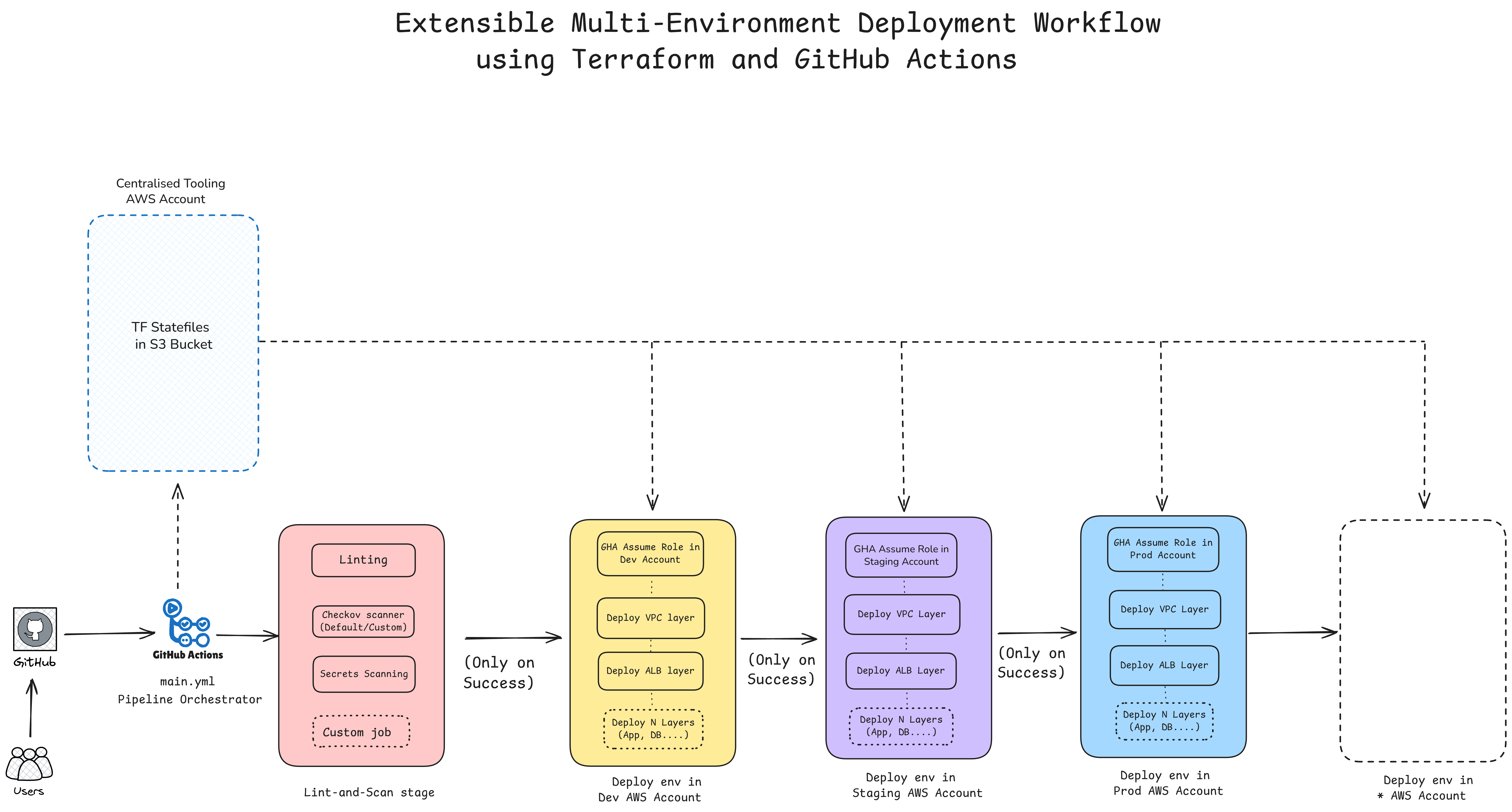
- GitHub Link: Terraform + GitHub Actions workflow
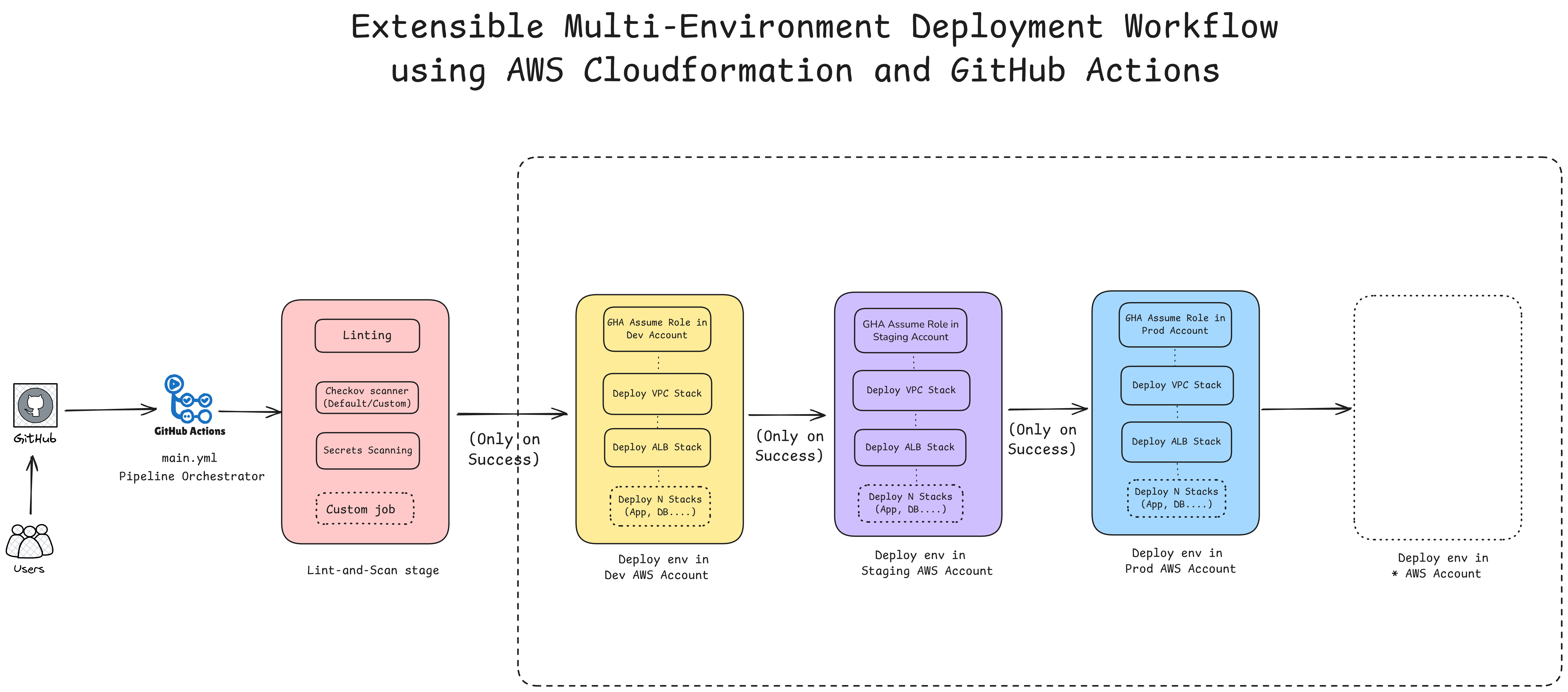
- GitHub Link: CloudFormation + GitHub Actions workflow
Both are designed to be extensible for multi-environment deployment workflows with proper state management and CI/CD integration.
#IaC Tools
#Cloud-native tools
AWS CloudFormation uses JSON or YAML templates and provides deep AWS integration. Azure Resource Manager (ARM) follows the same approach for Azure. Both trade portability for tight integration with their respective clouds.
#Terraform
Terraform is HashiCorp’s multi-cloud tool. It uses HCL syntax and tracks infrastructure through state files. Its learning curve is offset by broad provider support across platforms such as AWS, Azure, and Cloudflare.
#AWS CDK
AWS CDK lets you define infrastructure in languages such as Python and TypeScript, then deploys CloudFormation stacks behind the scenes.
#Pulumi
Pulumi takes a similar programming-language approach but works across clouds through different providers.
#What I’ve Learned
Start small: Don’t try to convert all your infrastructure into IaC at once. Pick a dev environment or a single service. Get that working, then expand gradually.
Foster IaC culture and enforce the “no manual changes” rule: The biggest IaC killer is someone making a “quick fix” in the console. Build a team culture where all changes must go through code.
Implement proper CI/CD: Infrastructure changes should trigger the same review process as application code. Use GitHub Actions, Jenkins, or similar tools.
Use remote state storage: Store Terraform state in S3 or similar remote backend. Local state files cause conflicts and data loss.
Design for modularity: Split infrastructure into logical modules (networking, compute, database). A single 5000-line Terraform/CFN file is unmaintainable.
Shift left security with automated testing: Use tools like Checkov or tflint to catch security issues and misconfigurations before deployment. Integrate these into your CI/CD pipeline to prevent insecure infrastructure from reaching production.
Other considerations: Use native IaC features such as infrastructure import, secrets management, and parameter validation.
#Conclusion
Infrastructure as Code transforms infrastructure management from a manual, error-prone process into a systematic, repeatable practice. The initial learning curve and tooling investment pays dividends through reduced downtime, faster deployments, and better compliance.
The fundamental shift is treating infrastructure like software: versioned, tested, and deployed through automated pipelines. Organizations that embrace this approach find they can scale infrastructure management without proportionally scaling their operations teams.